Friday, May 29, 2009

Watch Out! Google Wave is Coming...


YouTube - Google Wave Developer Preview at Google I/O 2009
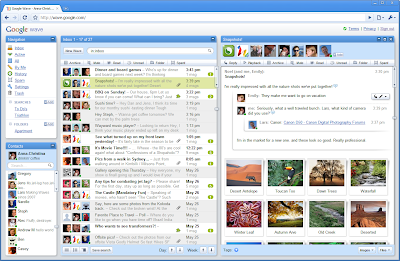
This is going to be huge! It has potential to take over Facebook, Twitter, E-mail, Microsoft Office, IMs, Wikis, Blogs... crazy!

Pure Awesome @35:40 video mark...

Thursday, May 28, 2009

Official Google Blog: Went Walkabout. Brought back Google Wave.


Official Google Blog: Went Walkabout. Brought back Google Wave.

This is going to be freaking cool! Think of it as a completely new way to share and interact with your friends online in both real-time and asynchronously. It's what E-Mail and IM would be like if they were invented today. It's a virtual mash-up of the best features of GMail, Google Talk, Google Reader and Wikipedia. Awesomesauce!

FilesOverMiles: Easily send large files directly between computers for free


FilesOverMiles: Easily send large files directly between computers for free

Great tool that you can use to send files to friends right through your webrowser without having to use any software or clogging your e-mail box.

Friday, May 08, 2009

Picnik - Online Photo Editting

I've recently been posting to my new blog http://christnology.com/ a lot more, but I don't want to completely abandon this one. I'll keep maintaining this blog for anything that doesn't quit fit the "Christ in Technology" perspective.

Today, I'm recommending a great web service, picnik . I have been on since the beta, but just recently have gone back to it and I must say -- I'm very impressed! 


It's basically an excellent watered-down version of Adobe Photoshop, in your web browser! It's very fast and can plug into various other online services such as Facebook (to grab photos from your galleries), Flickr, Photobucket, MySpace, Twitter, etc. It lets you crop and edit pictures, adjust color, add effects, add frames and pretty much any basic thing you'd need to do to images.

It's not a complete Photoshop replacement, but it'll do the job when you're in a pinch, or if you just need to do a little tweaking.

http://picnik.com/

Monday, March 30, 2009

Seeing Christ in People

I think I want to gear this blog more towards how we can use technology on our path to Christ. Of course there will be the general software recommendation and other technology related posts that may or may not relate to Christianity, but I think it would be interesting to see if I can gear this more towards finding Christ in technology. It could turn into a really interesting blog, or it could fail to materialize. Eh, whatever God wills, right? =)

EDIT: I've decided to rename the blog and move it to a fresh space. Please see http://christnology.com/

Tuesday, October 14, 2008

Norton Solves Windows Vista UAC Woes

Norton has created a great little utility that attempts to solve the Windows Vista User Account Control (UAC) woes.

image

Albeit annoying, Windows Vista’s UAC feature is a great security tool that alerts the user before any potentially damaging system actions are taken. The problem is the user is frequently prompted with UAC dialog boxes on various actions that may otherwise seem trivial and sometimes even confronted with multiple prompts for a single action.

Although Microsoft has reportedly addressed the concern in the upcoming Windows 7, users have resorted to either silencing UAC altogether with a registry hack or TweakUAC or disabling it altogether in the mean time. Both not very secure alternatives.

Norton has seen the need for a solution and has provided a great, free utility that provides the same security benefits of Windows Vista’s UAC prompts but with the added functionality of remembering previous confirmations and providing more detail on the action to be taken. In addition to this, Norton’s UAC Tool will also optionally report confirmations from users and create a white-list to be distributed when the app gets out of beta to minimize unnecessary prompts.

Check out Norton Labs’ UAC Tool.

Saturday, April 12, 2008

Windows Live Writer

I just downloaded the latest version of Windows Live Writer. It has a really awesome interface that will allow you to post to various weblogs, not just Microsoft's Spaces.

For anyone that has a weblog, be sure to check out the latest version of Windows Live Writer that apparently fixes a few bugs with Blogger.com. Great stuff, really.

You can download it here.

I'm never gonna give this up! :)

Saturday, January 05, 2008

Floola

Ever wanted to transfer your music from your iPod to your computer? No, you can't do that with iTunes... believe it or not. What seems to be a relatively simplistic task is otherwise impossible without using some third-party application.


Here comes Floola to the rescue! Despite the otherwise goofy name, this little application is a life saver for many who would like to spread their digital music collection love... or are just recovering from a hard drive failure.

In addition to allowing manipulation of your music collection on your iPod, Floola will also import incompatible song or video types and convert them to a format the iPod will recognize. But the fun doesn't stop there, Floola can also import YouTube and even MySpace videos by just supplying the URL.

The best part? Floola requires no installation, which means that if you enable your iPod for Disk Usage (an option selectable from within iTunes) then you can place Floola in its own directory on your iPod. Now, next time you connect your iPod to your computer, or a friends computer, you won't even need to open iTunes up to view, play or copy songs. Good stuff, good stuff in deed.

Even better? It's free!

Floola

Wednesday, January 02, 2008

How to Get Windows Defender to Stop Blocking Startup Programs

Finally an answer! I'm so sick of the "Windows has blocked some startup programs" message and I have been searching for quite some time for how to get Windows Defender to stop blocking certain startup programs from running. I think it's a little ridiculous how difficult Microsoft makes this seemingly popular task. I have searched several times and have found several different proposed solutions, but none as elegant as the one I just found recently.


A simple program written by Jimmy Brush will analyze all of your startup applications and detail which ones are being blocked upon startup. From there, you can select to run the program as an administrator and say good bye to the incessant Windows Defender blocked startup prompts.

Download JB's Startup Program Unblocker

Tuesday, January 01, 2008

Happy New Year

Happy New Year to all. Stay safe and God bless!

-magik

Saturday, December 29, 2007

Tom's Hardware

Tom's Hardware is a great place to look up benchmarks for various PC components; including graphics cards, processors, etc.

The Desktop VGA Charts 2007 is a great resource for the latest desktop graphics cards benchmarks. Their numbers are tried and tested and can definitely be trusted.

Next time you're shopping for something, check out this site, definitely.

Nero Lite / Micro

It's disgusting how bloated Nero has gotten lately. Especially with version 8. There are so many useless tools bundled in with the installer that it rivals the bloat of AOL since the version 7+ days. Ugh! Even choosing a custom installation and unchecking everything but the Nero Burning Rom still adds bloat to your system with the Nero ControlCenter and Nero Scout. No thanks, Ahead, I do not need yet another indexing service slowing down my PC. The built-in Vista search indexer works just fine.

But I still do like the Nero Burning Rom. I have tried others, but none offer the flexibility and versatility of the Nero Burning Rom engine. Now, how do I get that without all the bloat? Well, I could modify the MSI installation package and remove all entries that I don't need, but why should I go through the hassle when the lovely people at Updatepack.nl have done it for me?

Yeap. Never again will I download over 400MB of "trial" bloat from Nero's servers. Instead, I'll opt for a slim 41 MB of Nero Lite goodness.

http://updatepack.nl/

Wednesday, December 26, 2007

Halo 3 Forged Suicide

Wow, this guy has a lot of time on his hands but it's pretty awesome, I must say!

I would download it and play around with that map, but I didn't buy the map pack yet. I think I'm going to wait until they're free. $10 is just too much for 2 maps and a template :P

Monday, December 24, 2007

Launch Apps

Today's post is focused on command-line-esque launch applications. Both are essentially replacements for the Windows run command (WinKey+R) and help you get to your applications quicker by using command-line names instead of having to browse and click through for shortcuts.

Launchy
Launch is an open-source Windows application launcher. It has built-in features to search Google and other websites. It can lookup weather forecasts and it indexes your Start Menu to provide quick access to everything registered there. Of course, it's completely free and has a great interface to boot.


Executor
Executor is very similar but expands on the features list a bit; such as drag and drop functionality. It has commands to manipulate the current window and can even override the Windows Run command.


Both are skinnable and both provide some great added functionality to your system. Definitely recommended.

Saturday, December 22, 2007

Auto-Elevate UAC Prompts with TweakUAC

Another day, another useful app.

TweakUAC is a small little utility that will enable an option in Windows Vista to auto-elevate UAC command prompts. As is suggested by several Microsoft bloggers and other users 'in the know', you really shouldn't run Windows Vista without UAC turned on, but the frequency of the prompts can be quite frustrating and annoying.

It is important to note, however, that the UAC isn't a 'dumb always-prompt' feature. It actually does "learn" from your answers. So, for example, if you frequently run a certain application or do a specific task and allow the elevation a number of times, then eventually UAC will stop prompting you about that specific task. But yes, that is all in theory; the actual procedure does vary quite a bit and it may sometimes seem like it never "learns" anything. The price we pay for security, eh?

Well anyway, back to the app for this post. TweakUAC will basically auto-enable the following feature (directions as posted by Microsoft blogger, Tim Sneath):
  1. From the Start search bar, type "Local Security Policy"
  2. Accept the elevation prompt
  3. From the snap-in, select Security Settings -> Local Policy -> Security Options
  4. Scroll down to the bottom, where you'll find nine different group policy settings for granular configuration of UAC.



So, although you can do this yourself manually, TweakUAC will do this for you automatically. It is essentially a GUI for the aforementioned process.

Friday, December 21, 2007

Lifehacker 2007 Guide & iTunes Apps

Lifehacker's 2007 Guide to Free Software and Webapps


Some great free apps in there. Some pretty obvious, but the are others that you would never have thought were free. OSI FTW! :)

The 23 Best iTunes Add-ons

They have also listed the 23 best iTunes add-on. I love iTunes. Although it is a little bloated and painfully slow with a fairly large media library (50+ GB), it is the easiest and most advanced music manager out there in my opinion. Lifehacker has put together some great add-ons that will enhance iTunes even more.

Some of the highlights:
  • moreTunes - Displays an album art pop-up while playing and repairs metadata for your songs
  • iTunes Export - Export your iTunes music library to an external storage device or another computer
  • iTunes Sync - Get iTunes to sync with non-iPod mp3 players
  • iSproggler - Automatically upload your iTunes listening habits to last.fm
There are a bunch more quality apps in there so definitely check out the complete list. There are some especially good ones for Mac users as well.

Thursday, December 20, 2007

Mozy Free 2GB Online Backups

Mozy.com

Gets you free unlimted 2GB backups. Everyone should have some sort of backup going on, even if it's just your 'My Documents' folder. I learned my lesson once when I lost 2 years worth of programming work when my hard drive failed on one of my older computers. Ever since then I have been using periodic CD or DVD backups and it's usually just a matter of dragging and dropping my Documents folder. Now with this, I don't have to worry about cataloging those disks anymore. One less thing to clutter the desktop.

Sign up now

Tuesday, April 12, 2005


2005 Dodge Charger... sweet!

2005 Dodge Charger

Saturday, April 02, 2005


Can I have a Ferrari? PLEASE?!